Rotary Switch (S1), Setting IP address
|
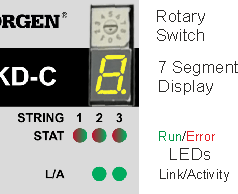
The configured IP address (depending on the current rotary switch S1 position) will be displayed on the 7 segment at Ethernet cable connection time and at power-on, if an Ethernet cable is connected. The IP address can be flashed across the LED seven-segment display by pressing B1 Push-button (B1). |
By default, the MKD-C utilizes the rotary switch to acquire its IP address. A method of setting the IP address independent of the rotary switch is available. More information is available in the MKD-C User Guide or in the Settings Screen-> Fieldbus-> TCP/IP screen in WorkBench.
|
|
Kollmorgen recommends to use AutoIP addressing. |

Dynamic IP addressing (DHCP and Auto-IP)
|
S1 Setting |
MKD-C DHCP/AutoIP address |
|---|---|
|
0 |
The IP address of the MKD-C is obtained from the DHCP server on your network. If no DHCP server is found the IP addresses is an AutoIP address (it is internally generated following the AutoIP protocol and will look like 169.254.x.x). |
With S1 set to 0, the device is in DHCP mode. The MKD-C will acquire its IP address from an external DHCP server if present in the network. If a DHCP server is not present, the MKD-C will assume an Automatic Private IP Address.
If your PC or PAC is directly connected to the MKD-C , and set to obtain an IP address automatically in the TCP/IP settings, a connection will be established with both devices using compatible automatic generated addresses. It can take up to 60 seconds for a PC to configure an Automatic Private IP Address.
Example for an AutoIP system see System Setup.
|
|
The PC subnet mask must be set to 255.255.255.0 or 255.255.255.128 |
Static IP addressing
|
S1 Setting |
MKD-C Static IP Address. |
|---|---|
|
1 to 9 |
The IP address is 192.168.0.n, where n is the number set with the rotary switch. This setting generates addresses in a range from 192.168.0.1 to 192.168.0.9. |
For static IP addressing set rotary switch S1 to a number from 1 to 9.
Example: if S1 is set to 5, then the IP address is 192.168.0.5
|
|
If MKD-C has a static IP address, in WorkBench devices with static IP address are visible, only. |
Changing the IP address
If the switch is altered while 24 V Logic power is supplied to the MKD-C , you must switch off and then switch on again the 24 V supply voltage. This action will reset the address.


